


We gifted this frame and we have received so much thanks and appreciation from the recipient. Complimented on the perfect size, ability to see such clear images across the room, ease of use and uploading. Looks and functions perfectly. The experience with HomeLife Tech was 10/10. Wonderful business and team.

Why Australians Choose Lifeframe Digital Photo Frames?
Australia's first official Frameo partner
All Lifeframe digital photo frames are powered by Frameo, the same trusted photo-sharing platform used by families worldwide.
Australian stock & 12-month warranty
All frames are held in Australian stock and backed by a 12-month warranty and local support.
Local help available for before and after purchase
Call our friendly team if you have any questions, or via support@homelife.technology
30-Day Satisfaction Guarantee
If you're not happy, we're not happy. You can return your purchase for any reason within 30 days. View our returns policy here.
Digital Photo Frame & Calendar

Lifeframe can now sync with your favourite calendar, while still being the world's best digital photo frame.
Frameo Digital Photo Frame Features

Collage Mode
Display up to 6 photos at once. Lifeframe can show multiple family photos together on one screen.

Create Albums
Keep your photos organised. Group special memories by family, holidays, events or loved ones.

Add Personal Messages
Send messages with love. Add captions to your photos so loved ones know the story behind them.

Reactions
React to the photos you receive. Family members can react to photos and stay connected from anywhere.

Super easy to use
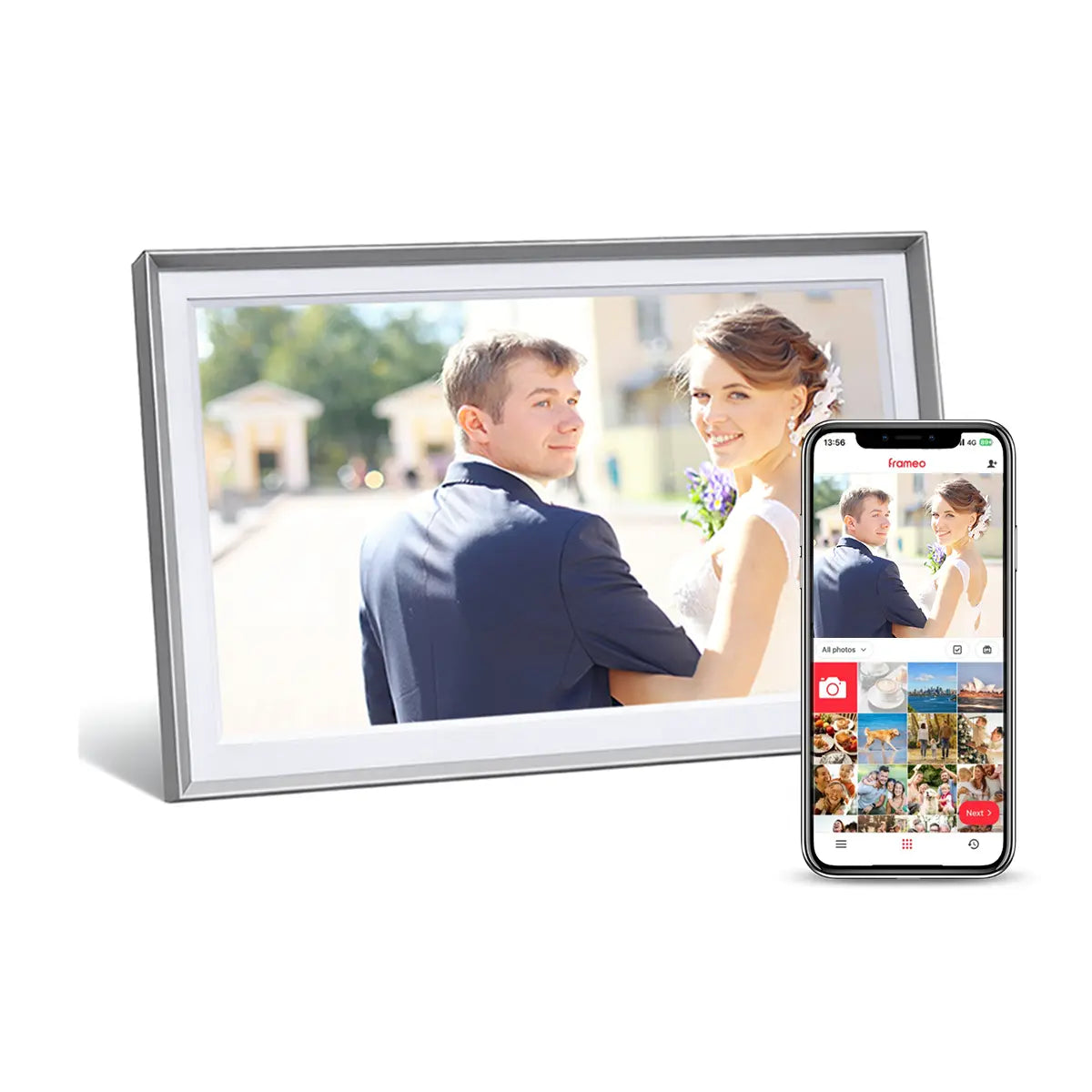
Share instantly from your mobile phone. Use the official Frameo app to send photos directly to your Lifeframe.

Share Videos
Videos that bring a smile. Send up to 15-second videos from your phone using the free Frameo app.
World's Favourite Photo Frame App

All Lifeframe digital photo frames are powered by Frameo.
Frameo is the world's most trusted photo frame software.
As Australia’s first official Frameo partner, no one knows Frameo better. We’re here to help!

How to Set Up Your Digital Photo Frame?
1. Install the free Frameo app
Download the highly rated free Frameo app to your iPhone or Android phone.
2. Pair with your digital photo frame
Scan the QR code shown on the frame to connect your phone in seconds.
3. Send photos instantly
Once connected, you can send photos and video memories straight to the frame from anywhere in the world.
Designed for Easier Everyday Connection
Choosing a digital photo frame for loved ones comes with practical questions. Will it display photos instantly and clearly? Will it be easy to use? Lifeframe is designed to make every step simple.

Large, Clear Display
A bright, high-resolution screen with wide viewing angles that is easy to see from across the room.

Simple Touchscreen
Tap or swipe to switch photos,open menus and settings, no
complicated buttons.

Simple for Loved Ones
Once set up, there’s no app, account or password for your loved one to manage
Designed for Australian Families
Designed for Australian Families

Works Without WiFi
Photos already saved to the frame keep playing, even without Wi-Fi.

Clock & Weather
Shows today's weather plus a 4-day forecast.

Calendar Feature
You can sync with your calendar, Apple, Google, Microsoft or Yahoo.

Auto-Rotates Photos
You can use the photo frame in either an upright or horizontal position.
Trusted by thousands of Australian customers
Customer Reviews
Overall rating: 4.9 / 5 from 2011 reviews.
Great quality display. Easy to use yet highly customisable. What a great way to receive photos from friends and family directly to your frame with the confidence that privacy is protected.

No

Photo frame easy to set up and use. Good quality images. Good customer service.

It’s great for our Grandma who is in a home.

V.goof

We purchased this for our 89 year old mother who is in a nursing home. She loves it, the siblings can share photos and videos from interstate and they load instantly. The frame has also freed up valuable space in her room by limiting the number of photo frames she now has around the room. It also has good storage for all the photos and videos.

We love our picture frame. So easy to set up and after 10 years on the road travelling Australia, it helps bring back all those wonderful memories. Highly recommend!

My husband recently passed away and we miss him greatly. By each owning a frame, my son and I are able to share our memories. We love seeing a new photo pop up with another special moment we have recorded. I would recommend the digital frames to anyone.

I have purchased 3 of these frames and as a family we all love sharing photos and my grandkids love watching everyone, I would dearly love to gift my daughter in law one so then our whole family will be connected through sharing Beautiful memories

I absolutely love my frame. It has over 3000 photos on it. My family and friends love it as much as I do. It pretty much shows our family’s history with plenty of room for many more years. Thank you Jenny Chinn

I bought my husband the frame for him to take to work as a fifo worker. We upload new photos for when he gets home from work each day.

The only complaint is that I need 2. One for portrait photos and another for landscape.

Purchasing this digital frame is one of the best decisions I have ever made. I highly recommend this frame for anyone who wants to stay connected to their loved ones.

We have thousands of amazing photos hidden in our phones and our iPads. With Frameo they are alive and in front of us, every minute. Often I say: look look us on the Cruise in Bora Bora!

This frame is the easiest I have come across to use! So simple to have the whole family and friends as photos that appear instantly on the frame Highly recommend this frame

We love our Homelife Photo frame. It captures & displays our most treasured moments in life & we couldn’t be happier. An awesome addition to our home.

We love now looking at our family, friends and travel photos. Wonderful memories at a glance. Just purchased 3 more to give as presents. Highly recommend

Best thing we've ever bought. We have had our digital frame now for a several years and have recently decided to purchase a second one as a wedding gift for some close friends of ours. We love it. Great fir displaying both photos and videos and transferring from you mobile device could not be more simple.

Love seeing the photos rotations And seeing my grandchildren everyday Love it ALOT!

The quality and look of this photo frame is simply outstanding. Even the user interface is very easy to setup and use along with the app. It's definitely a great way to share and remember the many photos taken.

This is the second one in the family. We first purchased on for mum's 80th so the family can send her updated photos as some live in other states. I have now received one for my Birthday. App is easy to use, photos easy to upload. Adjusting or deleting photos is super easy. I love it.

I bought five as Christmas gifts and have now bought another two to give for birthdays. All the recipients, including myself, are thrilled with them. Clarity and ease of use is great!

Great digital frame. We are loving seeing photos that we haven’t looked at in years

My mum doesn’t use a smart phone and is absolutely delighted that she can now get photos sent to her with this new digital frame. The app is super easy to use and she doesn’t need to do anything. Love it!

it’s so easy to use and fabulous to get photos from our son in Sweden!! love love love it!

Love these frames, I’ve bought one for my mum, mother in law and father in law, since we moved away it’s a lovely way to share photos with them and keep them updated

Love this digital frame. Connects us to so many memories every time we are watching TV where the frame sits next too. Always sparks great conversation and memories

Impressive, easy to set up, easy to get others to connect to and send photos. Enjoying the contact either way family and friends. Recommend this product.

I bought it for my husband for Christmas he has dementia and we thought it would help him remember family. It’s great 😊

Absolutely love it! I bought this as a gift for my elderly parents. Most of our extended family lives overseas, so I shared the Frameo app with them and they’ve been surprising my parents with beautiful photos and videos. It means so much. I also uploaded lots of precious memories from their wedding and over the years, photos they normally wouldn’t look at. Now they get to enjoy them every day in a lovely slideshow. Such a wonderful gift! Now I just need more family members to get one too!

Placed one on the wall in the heart of the home so we can see it from the entire kitchen/living area. Having children living overseas can be hard, but now they can share their special moments by dropping in a surprise photo or video to our frame, and we feel so much closer. We have purchased one for each family member and we feel more connected than ever. I have even given one to my 88 year old mum, and she can work it very easily. When I had an inquiry, customer service was exceptional. We have both the black and the white but black really frames the photos beautifully. Love that we can now play in collage mode and we still get to watch the videos in this setting. I did plenty of research before purchasing and this was the best frame for sharpness, ease of use and price. HIGHLY RECOMMEND

Love seeing all my favourite photos up on the screen 24/7

It is such a delight to enjoy the pictures memes and other things my family want to share I love the surprises of seeing what I get each day As family live overseas and in other states it is terrific that they can add such wonderful things in there lives they want to share It makes me smile every day

My life frame is positioned in our meals area where our favourite photos rotate where we gather with friends and family. It's a great talking point, a trip down memory lane and sometimes a laugh. No need for frames that take up space and gather dust when a living frame has so much more to offer.

Just set it up yesterday and I can’t stop looking at it! There are so many great photos and memories on there and I love it so much! Set up was quick + easy! Plugged it on, turned it on, connected to Wi-Fi, downloaded the app and sent photos to the frame which was uploaded instantly! You can invite multiple people to the app too. I was hesitant on choosing which frame to get but I love the one I chose which was the 10.1” Wooden Beech one! Soo beautiful and looks high quality. Might have to find the Canadian equivalent to buy for my parents abroad!! It’s so special!!!

We have our frame in front of the tv yet we tend to watch the photos more and laugh and chat about them.

I live in a rental home that doesnt allow pictures hung on wall. This has been better than that. So easy to use i just love it.

Brought for my mum who recently entered Aged Care. She sits for ages watching the photos and seeing all the family calms her. The timer function is great. I have it set to come on at 7am and turn off at 7pm. Highly recommend thinking we'll upgrade to the 15 inch one soon.

Great photo frame easy to use Excellent for keeping the memories flowing
Lifeframe digital photo frames help families across Australia share photos instantly using the official Frameo app.

Australia’s Most Loved Frameo Digital Photo Frame*
Share photos instantly across the world
Family and friends can send photos straight to the Lifeframe using the Frameo app, wherever they are.
Available in 8", 10.1" and 15.6" sizes
Choose a size that suits a bedside table, kitchen bench, living room, aged care room or shared family space.
Every model includes 32GB storage (expandable)
Each Lifeframe digital photo frame includes generous built-in storage, with expandable storage available if you need more space.
Easy to set up and simple to use
*Most Loved is based on verified Australian customer reviews and publicly available review data at the time of publication.
Available Lifeframe Designs
Lifeframe is made to fit naturally into everyday spaces, from bedside tables and desks to shared family rooms and aged care rooms. Choose from classic, wooden and modern frame designs, with sizes to suit how and where the frame will be viewed.

Classic Series
8" / 10.1" / 15.6"
For desks, shelves, bedside tables and shared family spaces

Wooden Series
10.1"
A warmer frame style for bedrooms, living rooms and softer home interiors.

Metro Series
10.1" / 15.6"
A modern frame design for contemporary spaces, with larger options for easier viewing.
Satisfaction Guarantee
Buy with confidence. We're confident you'll love your Lifeframe Digital Photo Frame. However, if for any reason you decide it's not for you, simply let us know within 30 days and return it for a full refund. No questions asked.
Digital Photo Frames Frequently asked questions
How does the digital calendar feature work on the Lifeframe digital photo frame?
The calendar feature completely optional to use and there is no cost.
You can easily sync your favourite calendar with your Lifeframe and customise the calendar view in the settings.
☞ Click here to learn more about the Calendar feature.
Are there any ongoing costs for the Frameo digital photo frame in Australia?
No. There are no subscriptions required for any of the features that we promote above.
Additional features are available via a Frameo Plus subscription (accessed within the Frameo App). These additional features include, cloud back up, sending longer videos and sending more than 10 photos at once. Other features may also be introduced by Frameo from time to time.
The person I'm giving it to doesn't have WiFi. Will the Wi-Fi Digital Photo Frame still work without WiFi?
Yes. If there is no WiFi available the digital photo frame will continue to display a slideshow of all the photos it has already received, just like normal (this is because all photos reside on the frame and not in the cloud).
Many customers in this situation, simply connect the frame to their mobile phone's hotspot when they visit. The frame will then automatically connect and can be updated with new photos instantly.
Additionally, if someone sends photos while the frame is offline, those photos are queued on their phone until the frame is next online, at which point, the photos will be automatically sent to the frame.
Lastly, while the frame cannot receive new photos sent from mobile phones while offline, you can very easily import photos from a USB/SD card at any time.
Is it complicated to set up and use?
No. Set up is done in a few minutes and the recipient does not need to do anything to receive and enjoy photos from loved ones.
Do I need to have a mobile phone or computer to use this smart photo frame?
No. You don’t need a computer or mobile phone at all. Only those sending you photos, will need a mobile phone.
What type of mobile phone is required to send photos?
Pretty much any smart phone is supported (iPhones, Android, Samsung etc..).
Your family or friends will need to install the free ‘FRAMEO App’ on their phone.
It’s a free download from the Apple and Google App stores.
Can anyone send photos to my digital photo frame?
No. Only those that you allow will be able to send you photos.
If you want to hide a photo, two simple touches on the touch screen will hide it.
How many photos can the digital photo frame store?
All Lifeframe digital photo frames come with 32GB of built in storage (approx. 28GB usable) for Photo and Video storage. You can store many thousands of photos and videos, typically 20,000 to 30,000 photos!
You are VERY unlikely to ever run out of storage on a Lifeframe®.
It is good to remember that the operating system on any Digital Photo Frame will use up about 4GB of the available built-in storage. So when compared to other frames that typically only have 8GB or 16GB of built-in storage, you need to deduct the 4GB of system storage from the built-in storage. So for example, an 8GB frame will only have about 4GB of usable storage for Photos and Videos.
Can I use the digital photo frame in portrait or landscape mode?
You can use the photo frame in either an upright or horizontal position.
Photo’s will automatically rotate to fill the screen beautifully.
What if I can’t get the digital photo frame to work?
Simple. Send it back for a full refund. No questions asked. But it is so easy to use, we’re confident you’ll be just fine.
If you are stuck, just email us at support@homelife.technology and we’ll get back to you asap.
What type of image and video files does the digital photo frame support?
All the common photo/video formats are supported. Specifics vary slightly by transfer method as per below.
Direct Import (from USB, SD Card, PC)
- Images: JPEG, JPG, PNG, WEBP
- Video: MP4, 3GP
Android Phone (Frameo App)
- Images: JPEG, JPG, PNG, HEIC, WEBP
- Video: MP4, 3GP, MOV, HEVC
iPhone (Frameo App)
- Images: JPEG, JPG, PNG, HEIC
- Video: MP4, 3GP, MOV, M4V
Why choose Lifeframe over cheaper digital picture frames?
Cheaper digital photo frames may offer similar specifications, but specifications don’t always tell the whole story. Lifeframe is made to our specifications using a high-quality IPS display for bright, clear images and wide viewing angles.
Every Lifeframe is powered by official Frameo software, providing a trusted, simple and secure way for family and friends to share photos.
Most importantly, Lifeframe is selected for Australian families and backed by a local team you can actually contact. With Australian stock, local support and warranty, we’re here to help before and after your purchase!
You’re not simply buying a digital photo frame, but the confidence that it will be easy to use, reliable and properly supported.
What size digital photo frame is best for seniors?
A 10.1-inch digital photo frame is a practical choice for most seniors, offering a clear display without taking up too much space. For viewing photos from further away, such as across a living room, a larger 15.6-inch frame may be easier to see. An 8-inch frame is better suited to smaller spaces and close-up viewing, such as on a bedside table.
Read our Lifeframe Digital Photo Frame Size Guide
HOMELife Technology
- 100% Australian owned.
- Australian stock & Australian support.
- Our mission is to supply easy-to-use products that enhance life, independence & personal wellbeing.
- Our priority is you. We'll always treat you the way we would like to be treated ourselves.
