
Skip to product information
1 of 23

Digital Calendar

Regular price $169.00
Regular price $199.00 Sale price $169.00
Sale Sold out
Shipping calculated at checkout.

Key Features

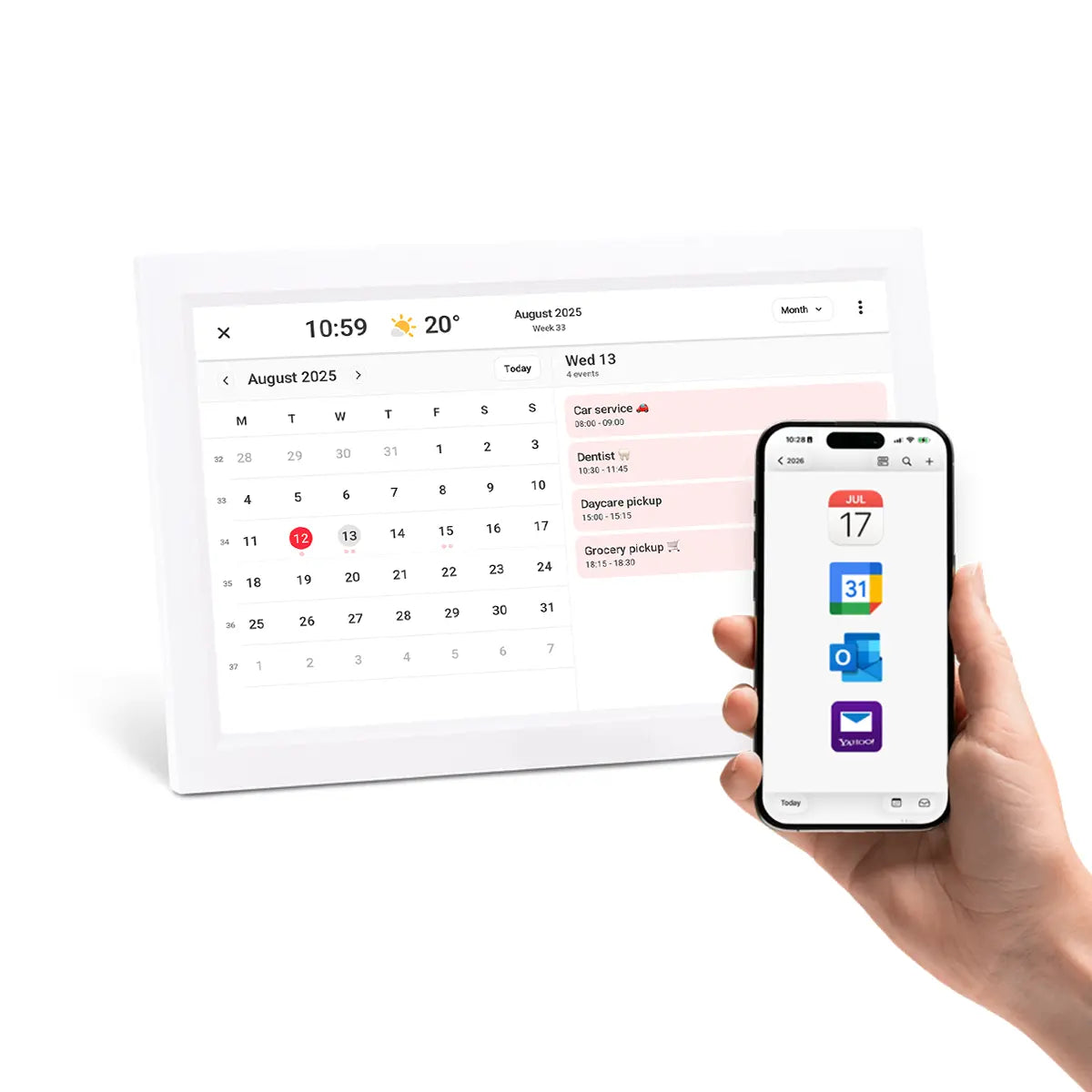
  • Auto-synced Calendar
  • No subscriptions
  • Hybrid Photo Frame + Calendar
Choose Size
Select Style
Colour
Quantity
Free Fast Delivery
30 Day Satisfaction Guarantee
Australian Stock & Support
Seniors Card Discount Available
View full details

A Practical Gift for Mum & Grandma

Our Digital Calendar is a thoughtful Mother's Day gift for Mum or Grandma that helps keep everyday family life organised. With a clear shared display for appointments, reminders and routines, it gives everyone one simple place to stay updated.

Sync with Your Existing Calendars

Powered by Frameo system, Lifeframe™ works with the calendars you already use, including Apple, Google, Outlook and Yahoo. Simply scan the QR code on your frame and your calendar will sync to the frame.
It's that simple and the best part, no subscription required.

Auto-synced calendar

Still The Best Digital Photo Frame

When the calendar view is hidden (or in hybrid mode), Lifeframe is still the best digital photo frame, making it easy to enjoy memories and make memoiries, all from the one screen.

Digital photo frame lifestyle

Five Viewing Modes

Photos Only View

Minimise the calendar to enjoy your photos, full screen.

Photos Only View

Hybrid View

Enjoy photos and keep track on daily plans.

Hybrid View

 4 Day View

A focused look at the days ahead.

 4 Day View

Weekly View

For planning the week together.

Weekly View

Monthly View

For a full overview of upcoming events and important dates

Monthly View

How Lifeframe Frameo Calendar Works

Frameo calendar add an event

Events

Optional subheading

All calendar events from your phone automatically sync to the frame

Frameo calendar auto-rotate

Auto-rotates

Optional subheading

Portrait or landscape, the calendar will automatically rotate.
Table stand or wall-mount built in.

Frameo calendar colour coding

Color Code Events

Optional subheading

Choose from 7 different colours to personalise your calendar.

Available Lifeframe™ Models

black and white colour calendar frame

Classic Series

wooden style calendar frame

Wooden Series

metro stylr calendar frame

Metro Series

FAQ

What calendars can I sync with Lifeframe?

Lifeframe calendar supports syncing with all popular calendars such as Apple, Google, Outlook and Yahoo.

Can multiple family members share events on Lifeframe Calendar?

All events in your synced calendar will appear on the frame. Family simply add you to an event for it to appear, just like a normal online calendar.

Does Lifeframe Calendar need Wi-Fi?

Yes. To use the calendar feature, Lifeframe needs a Wi-Fi connection so it can sync your events to the calendar.

How many calendars can I sync to my Lifeframe?

Lifeframe supports one primary synced calendar, helping keep the screen clean, easy to read, and simple for the whole family to follow.

Can Lifeframe Calendar be wall mounted?

Yes, Lifeframe comes with a stand, or can be mounted on a wall, making it flexible for different Australian home setups. All models include a simple picture frame hook for hanging.
Additionally, all 15.6" frames also have a VESA mount supporting 75mm industry standard VESA mounting brackets.

Does Lifeframe Calendar run on battery power?

All lifeframe photo frames require power to display photos and calendars. When power is disconnected, all settings and photos are retained.

Is Lifeframe Calendar easy to set up?

Yes, simply scan the QR code on the screen using your phone, choose the calendar that you wish to sync, and thats it. Your calendar will sync with your frame.

Can I remove the calendar from my Lifeframe display?

Yes, it's easy to remove the calendar from your frame.

You can hide the calendar at any time, or you can remove it completly following the below steps.

On your frame:
Go to Settings > Calendar > Select your calendar > Remove calendar

In the Frameo app:
Select your frame, then go to Calendar > Settings (⋮) > Remove calendar

If you have not added a synced calendar, the feature remains hidden until you choose to enable it.

Does Lifeframe Calendar support Tasks and Chores?

Liferame Calendar displays calendar events that are synced to your frame. It does not currently support chores or tasks.

Australian Support

At HOMELife Technology, we care about quality and local support.

✔︎ All products are backed local warranty and support so you know exactly what you are covered for.

✔︎ Every order is dispatched from Australian stock for fast reliable delivery.

✔︎ We're here to help. If you need help choosing the right model or setting it up, our Australian-based team is available to assist.