


Digital Photo Frame
🇦🇺 Australia’s most-loved digital photo frame
Frameo Digital Photo Frame Australia
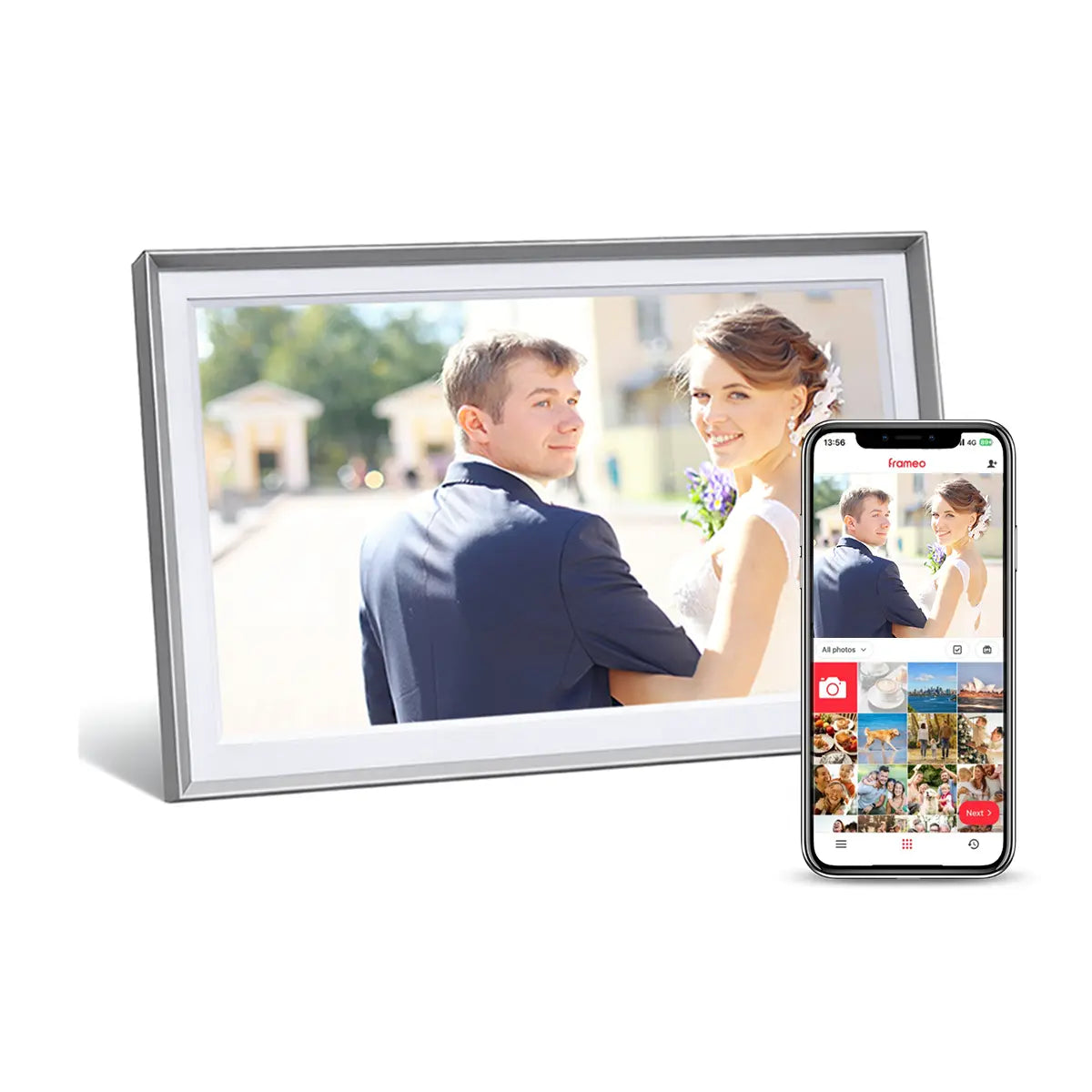
Easy to use and made for instant photo sharing, Lifeframe digital photo frame helps families stay connected.

Digital Photo Frame Features
All Lifeframe Digital Photo Frames Include
All Lifeframe Digital Photo Frames Include
- Official Frameo software, no subscription fees
- Free calendar mode
- Instant photo and video sharing
- Unlimited family contributors
- 32GB storage on every model
- Expendable with USB stick
- High-quality screen with extra-wide viewing angle
- Support for 22 languages
- Secure private sharing
- Easy-to-use touchscreen
- Built-in speakers
- Australian stock and local support
- Wall mountable
- Auto-Rotate
Digital Photo Frame Specifications
Digital Photo Frame Specifications
15.6" Digital Photo Frame
Best for: Larger rooms, shared family spaces, aged care rooms with easier viewing from a distance.
- Display: 15.6" Full HD screen, 1920 × 1080, 16:9 ratio
- Storage: 32GB built in
- IPS: for extra wide viewing angle
- Wi-Fi: Built-in 2.4GHz and 5GHz Wi-Fi
- Ports: Full-size USB, USB-C, full-size SD card slot
- Power: Australian power supply included, 5V @ 3A
- Classic Design: Black or White, 390 x 245 x 35mm
- Metro Design: Charcoal or Silver, 395 x 250 x 35mm
- Weight: 1.05kg
- Wall Mounting: Picture hanger and VESA 75mm wall mount
10.1" Digital Photo Frame
Best for: Everyday family gifting, grandparents, bedrooms, and general living areas.
- Display: 10.1" HD screen, 1280 x 800, 16:10 ratio
- Storage: 32GB built in
- IPS: for extra wide viewing angle
- Wi-Fi: 24GHz
- Ports: USB-C port and Micro SD card slot
- USB adapter for USB stick
- Power: Australian power supply included, 5V @ 2A
- Classic Design: Black or White, 263 x 182mm, 0.8kg
- Metro Design: Black, Silver or Mocha, 268 x 187mm, 0.8kg
- Wooden Design: Black, Walnut, Oak or Beech, 298 x 212mm, 1kg
- Wall Mounting: Picture hanger
8" Digital Photo Frame
Best for: Smaller spaces, bedside tables, desks and personal photo displays.
- Display: 8" IPS LCD touchscreen, 1280 x 800, 16:10 ratio
- Storage: 32GB built in
- IPS: for extra wide viewing angle
- Wi-Fi: Built-in 802.11 b/g/n Wi-Fi
- Ports: USB-C port and Micro SD card slot
- USB adapter for USB stick
- Power: Australian power supply included, 5V @ 2A
- Classic Design: Black or White, 222 x 156mm
- Weight: 0.6kg
- Wall Mounting: Picture hanger
Shipping & Warranty
Shipping & Warranty
- Fast FREE shipping within Australia.
- 30-Day Satisfaction Guarantee.
- 12 month local Australian support & warranty.
- $5 Gift wrapping available.
- Last minute gift certificates available.
- Click & Collect - Sydney Customers (Nth Parramatta)
Description
Description
Photos shouldn't be stuck on your phone.
These days, most photos are taken on our mobile phones and only shared on social media, but our digital photo frames provide a simple way to enjoy those precious memories without having to check Facebook or social media.
Lifeframe® digital photo frame allows you to see all the latest family photos right where you want to see them, around your house. It connects to the internet (using WiFi), so your friends and family can send precious moments (photos & videos) directly from their mobile phone to your beautiful digital photo frame.
A personal message/caption can also be sent and is displayed with each photo. Photos automatically appear in a slide show or you can scroll through them at your own pace using the built-in touch screen. And at night, the digital photo frame will automatically switch off into sleep mode and turn itself on again in the morning.
It's super easy to use, infact, once set up (which is also super easy), you don’t need to do anything, just sit back and enjoy seeing new photos and videos as they appear in the slide show.
Our digital photo frames are powered by Frameo, the world's number one digital photo frame software.



Why Australians Choose Lifeframe Digital Photo Frames?
Australia's first official Frameo partner
Australian stock & 12-month warranty
Simple touchscreen interface
ideal for families and grandparents
Local help available for before and after purchase
Call our friendly team if you have any questions, or via support@homelife.technology
30-Day Satisfaction Guarantee
If you're not happy, we're not happy. You can return your purchase for any reason within 30 days.
Digital Photo Frame and Calendar
Lifeframe can now sync with your favourite calendar, while still being the world's best digital photo frame.

Frameo Digital Photo Frame Features

Collage Mode
Display up to 6 photos at once

Create Albums
Keep your photos organised

Add Personal Messages
Send messages with love

Reactions
React to the photos you receive

Super easy to use
Share instantly from your mobile phone

Share Videos
Videos that bring a smile
Designed for Australian Families

Works Without WiFi
Stored photos keep playing normally

Clock & Weather
1-Day and 4-Day Forecast

Calendar Feature
Sync with your favourite calendar

Auto-Rotates Photos
Landscape or Portrait
Frameo app is trusted by users all over the world on both iPhone and Android. As Australia’s first official Frameo partner, no one knows Frameo better. We’re here to help!

How to Set Up Your Digital Photo Frame?
1. Install the free Frameo app
Download the highly rated free Frameo app to your iPhone or Android phone.
2. Pair with your digital photo frame
Scan the QR code shown on the frame to connect your phone in seconds.
3. Send photos instantly
Once connected, you can send photos and video memories straight to the frame from anywhere in the world.
Trusted by thousands of Australian customers
Lifeframe digital photo frames help families across Australia share photos instantly using the official Frameo app.

Australia’s Most Loved Frameo Digital Photo Frame*
Share photos instantly across the world
Available in 8", 10.1" and 15.6" sizes
Every model includes 32GB storage (expandable)
Easy to set up and simple to use
*Most Loved is based on verified Australian customer reviews and publicly available review data at the time of publication.
Available Lifeframe Designs

Classic Series
8" / 10.1" / 15.6"

Wooden Series
10.1"

Metro Series
10.1" / 15.6"
Satisfaction Guarantee
Buy with confidence. We're confident you'll love your Lifeframe Digital Photo Frame. However, if for any reason you decide it's not for you, simply let us know within 30 days and return it for a full refund. No questions asked.
Frequently asked questions
How does the Digital Calendar Feature work?
The calendar feature completely optional to use and there is no cost.
You can easily sync your favourite calendar with your Lifeframe and customise the calendar view in the settings.
☞ Click here to learn more about the Calendar feature.
Are there any ongoing costs for the digital photo frame?
No. There are no subscriptions required for any of the features that we promote above.
Additional features are available via a Frameo Plus subscription (accessed within the Frameo App). These additional features include, cloud back up, sending longer videos and sending more than 10 photos at once. Other features may also be introduced by Frameo from time to time.
The person I'm giving it to doesn't have WiFi. Will the Digital Photo Frame still work without WiFi?
Yes. If there is no WiFi available the digital photo frame will continue to display a slideshow of all the photos it has already received, just like normal (this is because all photos reside on the frame and not in the cloud).
Many customers in this situation, simply connect the frame to their mobile phone's hotspot when they visit. The frame will then automatically connect and can be updated with new photos instantly.
Additionally, if someone sends photos while the frame is offline, those photos are queued on their phone until the frame is next online, at which point, the photos will be automatically sent to the frame.
Lastly, while the frame cannot receive new photos sent from mobile phones while offline, you can very easily import photos from a USB/SD card at any time.
Is it complicated to set up and use?
No. Set up is done in a few minutes and the recipient does not need to do anything to receive and enjoy photos from loved ones.
Do I need to have a mobile phone or computer?
No. You don’t need a computer or mobile phone at all. Only those sending you photos, will need a mobile phone.
What type of mobile phone is required to send photos?
Pretty much any smart phone is supported (iPhones, Android, Samsung etc..).
Your family or friends will need to install the free ‘FRAMEO App’ on their phone.
It’s a free download from the Apple and Google App stores.
Can anyone send photos to my digital photo frame?
No. Only those that you allow will be able to send you photos.
If you want to hide a photo, two simple touches on the touch screen will hide it.
How many photos can the digital photo frame store?
All Lifeframe digital photo frames come with 32GB of built in storage (approx. 28GB usable) for Photo and Video storage. You can store many thousands of photos and videos, typically 20,000 to 30,000 photos!
You are VERY unlikely to ever run out of storage on a Lifeframe®.
It is good to remember that the operating system on any Digital Photo Frame will use up about 4GB of the available built-in storage. So when compared to other frames that typically only have 8GB or 16GB of built-in storage, you need to deduct the 4GB of system storage from the built-in storage. So for example, an 8GB frame will only have about 4GB of usable storage for Photos and Videos.
What is your return policy?
Share a clear and concise answer here.
Can I use the digital photo frame in an upright position?
You can use the photo frame in either an upright or horizontal position.
Photo’s will automatically rotate to fill the screen beautifully.
What if I can’t get the digital photo frame to work?
Simple. Send it back for a full refund. No questions asked. But it is so easy to use, we’re confident you’ll be just fine.
If you are stuck, just email us at support@homelife.technology and we’ll get back to you asap.
What type of image/video files does the digital photo frame support?
All the common photo/video formats are supported. Specifics vary slightly by transfer method as per below.
Direct Import (from USB, SD Card, PC)
- Images: JPEG, JPG, PNG, WEBP
- Video: MP4, 3GP
Android Phone (Frameo App)
- Images: JPEG, JPG, PNG, HEIC, WEBP
- Video: MP4, 3GP, MOV, HEVC
iPhone (Frameo App)
- Images: JPEG, JPG, PNG, HEIC
- Video: MP4, 3GP, MOV, M4V
Why choose Lifeframe over cheaper digital photo frames?
Cheaper digital photo frames may look similar, but a few things to note:
- Screen quality varies greatly across photo frames. Some frames even use reconditioned screens.
All our frames use high quality IPS screens for bright and wide viewing angles.
- All Lifeframe use the official Frameo software. Many frames use imitation software that has limited support and questionable security.
- All Lifeframe photo frames are made for us, to our specifications.
- And of course, you get local Australian stock, support and warranty.
Need Help Choosing a Lifeframe Size?
HOMELife Technology
- 100% Australian owned.
- Australian stock & Australian support.
- Our mission is to supply easy-to-use products that enhance life, independence & personal wellbeing.
- Our priority is you. We'll always treat you the way we would like to be treated ourselves.
