Day Hub Support
Get help setting up Day Hub, managing task reminders and using Day Connect for daily routine support around the home.
Manuals & Downloads
Download the available product resources below.
PDF Download
Day Hub User Manual
Setup instructions, product information and basic troubleshooting.
Looking for additional support?
If you purchased this product through a retailer, they may be able to assist you directly. You can also contact our support team by (02) 7228 7211 or support@homelife.technology.
Frequently asked questions
What are the dimensions of the Day Hub and its screen
The Day Hub™ physical dimensions are: 185mm x 247.5mm x 27.6mm (HxWxD).
The display is a 7" screen (measured diagonally). The screen height and width are 86mm x 154mm (H x W).
How do Day Hub & Day Connect pair together?
They pair together using WiFi Direct (their own built in WiFi to connect directly to each other). Hence why there is no requirement for a WIFi Router or Internet connection.
Can I use the Day Hub on its own?
Yes. The Day Hub™ is designed to be used on its own to enable more independence. By adding a Day Connect, you can be alerted to tasks while in different rooms of the house.
Can I use the Day Connect on its own?
Yes, you can. However, the Day Connect™ has limited functionality when used on its own. It simply displays the time, day, date. It needs to be paired with a Day Hub™ to provide the task alert function.
How long is the power cord?
The power cord is 185cm/73" long.
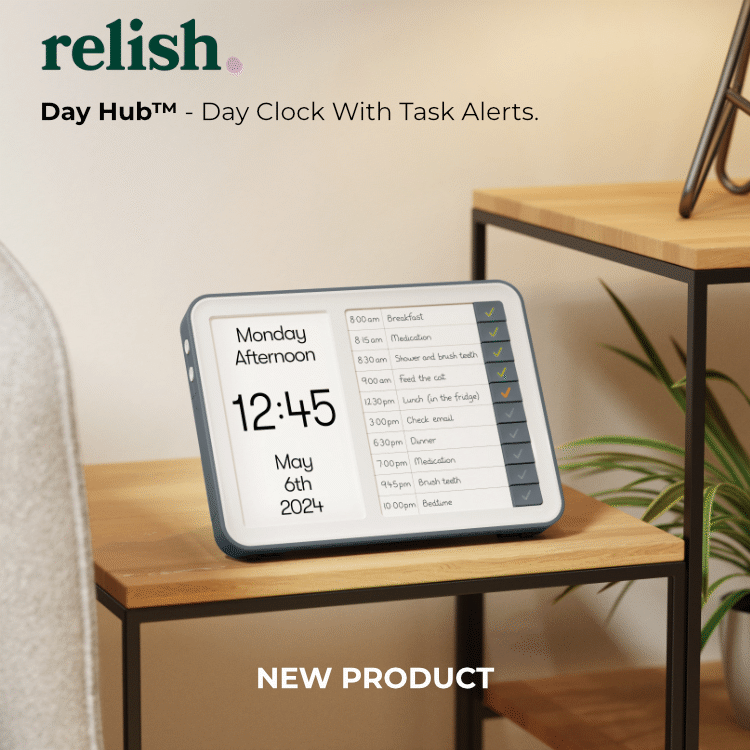
How do the task alerts work?
The Task Alerts, once set up, will sound on the device at the same preset time every day, helping you keep a regular routine.
When a task is due for completion, the corresponding Task Button will flash orange, and an audible alert will sound.
When you complete the task, simply press the Task Button to mark it as completed. It will then glow green, giving you a visual record of which tasks have been completed that day.
Uncompleted tasks will continue to glow orange.
Do they operate on batteries?
No, both products require a power adapter. However, there is a battery built in which will provide a back up if product is unplugged or there is a power outage.
Once power is restored, the Day Hub and/or Day Connect will automatically restart with all settings/alerts retained.
Do they support 24 hour time?
Yes, you can choose your preference for 12hr or 24hr setting. You will be guided to do this during the initial set up.
How does the auto daylight savings work?
During set up, you will be asked what specific Day Light Savings time zone you are in. The time will then automatically adjust, for daylight savings time, so you don't need to worry.
Can I obtain additional task list cards?
The Day HUB is supplied with five Task List cards.
You can also download and print additional task list cards here.
This file can be populated on your computer and then printed. Alternatively, contact us and we will happily send you additional Task List cards.